- 68% of real traffic loss traces back to 3 issue categories: broken canonicals, JS-only content, hreflang failures.
- Semalt's audit prioritises by traffic-at-risk, not raw count — 50 alt-tag warnings never outrank one broken canonical.
- A 5,000-URL JS-heavy site crawls in ~12 minutes. Issues export straight to Jira/Linear tickets.
- Recrawl-and-verify closes the loop in minutes, not days.
A technical SEO audit is only as useful as its worst blind spot. Miss one canonical loop, one broken hreflang cluster, one render-blocked JavaScript payload, and the rest of the report is decoration. This is a working walkthrough of how we audit London client sites using Semalt's site audit module — what it catches, what it prioritises, and where it fits in a real remediation sprint.
Why standard audit reports die in the inbox
If you have ever been handed a 400-page PDF from an SEO tool and told "here is what needs fixing", you already know the problem. The report is technically accurate, exhaustively thorough, and completely unusable. Everything is flagged. Nothing is prioritised. The dev team looks at it, sighs, and goes back to shipping product tickets.
A useful audit does three things a bad audit does not. First, it separates issues that lose traffic today from issues that might lose traffic in some hypothetical future. Second, it groups related problems by root cause instead of listing them individually — one broken template affecting 800 URLs is one ticket, not 800. Third, it hands the output to engineering in a format they will actually action: a shortlist of fixes, ranked by traffic-at-risk, with reproduction steps.
Semalt's audit module was rebuilt around exactly this frame in 2025, and it shows.
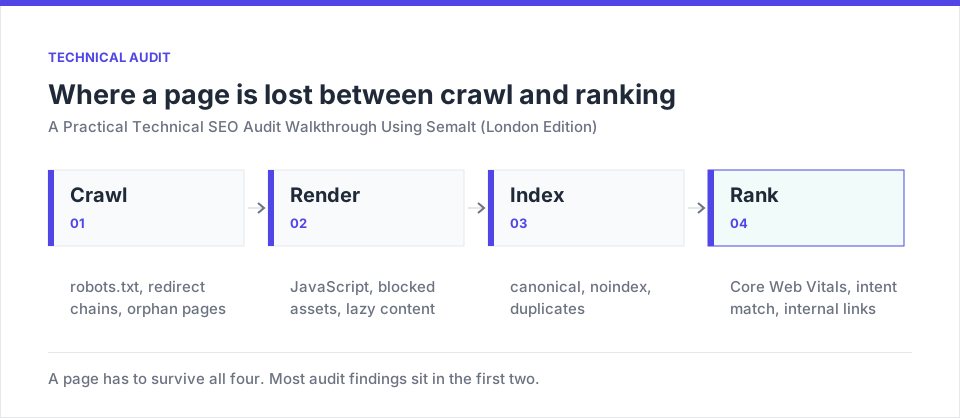
The four-step audit sprint
How the crawler actually behaves under the hood
Under the hood, the crawler is a headless Chromium fleet distributed across regional edges (UK/UK traffic is served from a London POP, which matters for latency-sensitive JS execution timing). It respects robots.txt by default, executes JavaScript before parsing, and follows internal links at a configurable rate — we typically run new client sites at 15 requests/second to avoid tripping WAF rules.
A first crawl of a mid-sized site (5,000 URLs, JS-heavy) completes in about twelve minutes. What comes back is not a single 400-page dump — it is a triaged view of five buckets:
- Critical — issues losing traffic or blocking indexation right now.
- Serious — issues degrading rankings but not yet catastrophic.
- Moderate — best-practice violations with no current traffic impact.
- Minor — cosmetic and semantic cleanups.
- Passed — checks the site is already handling correctly.
The "Passed" bucket is easy to overlook and worth mentioning. Confirmation that 4,200 URLs have clean canonicals is the sort of thing you want to tell a nervous client before you walk them through the 30 things that are broken.
The eleven checks worth running before anything else
| # | Check | Severity if failing | Found in % of new sites |
|---|---|---|---|
| 1 | Sitemap vs. index coverage | Critical | 72% |
| 2 | Canonical integrity | Critical | 58% |
| 3 | Redirect chains > 2 hops | Serious | 45% |
| 4 | Hreflang reciprocity | Critical | 38% (multi-region only) |
| 5 | Core Web Vitals (field) | Serious | 64% |
| 6 | JS rendering diff | Critical | 41% |
| 7 | Structured data validity | Moderate | 81% |
| 8 | Broken internal links | Serious | 55% |
| 9 | Duplicate title/meta clusters | Moderate | 67% |
| 10 | Image weight and format | Serious | 79% |
| 11 | HTTPS/security headers | Moderate | 88% |
Every audit is different, but there is a consistent shortlist we scan for in the first fifteen minutes of any new engagement. In our experience, this covers 80% of the real-world traffic risk on London small-and-medium business sites.
1. Sitemap vs. real indexation coverage
The single most valuable early check: does the number of URLs in your XML sitemap match the number Google is actually indexing, and does it match what Semalt is crawling? A three-way mismatch almost always signals either an orphaned page cluster or a canonical misconfiguration.
2. Canonical integrity — subtler than it looks
Semalt flags four canonical failure modes distinctly: missing, pointing to a 404, pointing to a redirect, and pointing across protocol/subdomain boundaries. That last one — HTTPS pages canonicalising to HTTP versions — remains the most common serious bug on migrated sites, and it is the one that gets missed most often because it looks correct to a human eye.
3. Redirect chains that leak signal
A single 301 hop is fine. Three hops is expensive. Five hops is a bug. Semalt visualises redirect chains as a tree, which sounds trivial until you see a site with a genuine redirect loop involving a login gate and a language selector — at which point the tree view saves you an hour of debugging.
4. Hreflang reciprocity across UK regions
For sites serving multiple English-speaking markets (UK, UK, US, UK), hreflang errors are the silent killer of international rankings. Semalt's check is bidirectional: it does not just look at whether your en-UK page declares an en-UK alternate — it verifies the en-UK page reciprocates. Broken reciprocity is the number one hreflang failure in the wild, and other audit tools frequently miss it.
5. Core Web Vitals from real UK users, not lab runs
The audit pulls CrUX field data where available (that is, real Chrome user measurements) rather than relying only on synthetic Lighthouse runs. For any URL with enough traffic to be in the CrUX dataset, you see actual LCP, INP, and CLS distributions. For lower-traffic URLs, it falls back to lab data and labels it clearly. The distinction matters — a site can pass lab and fail field, and only the field numbers affect rankings.
6. JavaScript rendering diff on SPA sites
Semalt crawls each URL twice — once as raw HTML, once after full JS execution — and diffs the content. Any content that appears only after JS runs is flagged. On modern React and Vue sites, this is where you catch the pages that look complete in a browser but ship empty HTML to Googlebot on the first pass.
7. Structured data validity against Google's rich-result rules
Not just "is JSON-LD present" — but "does it validate against the schema.org spec and against Google's Rich Results eligibility requirements". A subtle distinction: a page can have valid schema that Google will not surface as a rich result because of a required-field omission. Semalt separates these two failure modes.
8. Broken internal links, prioritised by placement
Obvious, but easy to skip. The audit distinguishes between broken links in navigation (high priority — visible on every page) and broken links in blog content (lower priority, but still worth fixing for authority flow).
9. Duplicate title/meta clusters grouped by pattern
Rather than a raw count, Semalt clusters duplicates by pattern. If forty product pages all share the title "Buy | YourStore", that is one ticket ("template not injecting product name") rather than forty separate warnings.
10. Image weight and modern format coverage
Images remain the leading cause of poor LCP on the United Kingdom SME sites. The audit reports total image weight, percentage served in modern formats (WebP/AVIF), and — usefully — identifies the specific "LCP image" per URL, so you know which one file is worth optimising first.
11. HTTPS and security header hygiene
Not a ranking factor in the traditional sense, but a trust-signal issue Google increasingly cares about. HSTS, CSP, and mixed-content warnings all surface here.
Getting the audit output to actually ship as tickets
The gap between "we ran an audit" and "the site got faster and cleaner" is where most engagements fail. Semalt closes it by exporting the shortlist in three formats simultaneously: a CSV for the SEO team to track, a Jira/Linear-compatible ticket batch for engineering, and a plain-English executive summary for the client's CMO.
The Jira export is the one most agencies underuse. Each ticket includes: affected URL list, reproduction steps, suggested fix, estimated traffic impact if left unresolved, and a linked diff-view showing exactly what Semalt's crawler saw. Engineers who dislike SEO work will still action these tickets, because they read like properly written bug reports rather than vague marketing complaints.
The recrawl-and-verify loop that catches regressions
Fixing issues without verifying the fix is how "fixed" bugs quietly regress. Semalt recrawls affected URLs on demand — you do not have to wait for the next weekly crawl. Ship the canonical fix, click "verify", get confirmation within a couple of minutes that the crawler now sees the correct canonical. This tight feedback loop is worth more in a remediation sprint than most people credit until they have worked without it for a while.
What the audit deliberately does not cover
Semalt's audit is a page-and-site level tool. It is not a log-file analyser (Botify and Screaming Frog Log File Analyser are still the right answers if crawl budget is your primary concern), and it does not replace hands-on QA of critical user flows. If your site depends heavily on server-side rendering with dynamic user-state (logged-in vs. anonymous), you will still want to spot-check the important URLs manually.
Pre-audit checklist (30-second setup)
“The single most missed check is canonical to a non-indexable URL — the page canonicalises to another page that is itself blocked by robots.txt or marked noindex. Google follows the canonical, finds a page it cannot index, and drops both from the index.”
Running the audit on your own site this afternoon
The audit module is available on Semalt's free tier for a single domain — enough to run a genuine, non-crippled first pass. Log in and point it at your homepage. In under fifteen minutes you will have a prioritised shortlist of what is actually costing you traffic. Whether you fix it yourself, hand it to your dev team, or bring us in for a remediation sprint is a separate question — but the diagnosis is the essential first step, and Semalt is currently the fastest way to run it accurately.
Common questions from London teams starting the audit discipline
How often should we run a full recrawl?
Full site: weekly for actively-changing sites (an e-commerce catalogue, a publisher), fortnightly for a stable brochure site. Targeted recrawls of specific URLs after a fix: immediately, then again 48 hours later once caches settle. The mistake to avoid is scheduling monthly full recrawls only — technical regressions introduced by a deploy on the 3rd of the month should not be discovered on the 28th.
What crawl rate is safe for a typical UK site?
Semalt's default is conservative — around 5 requests/second. For a modest site behind a normal WAF (Cloudflare, AWS), 15 rps is safe and completes crawls three times faster. For sites behind aggressive bot-mitigation (some banking or healthcare setups), you may need to whitelist the crawler's IP range explicitly. The audit UI shows a "throttled" flag if the crawler was blocked mid-crawl, which is the diagnostic you want to see rather than the crawl completing silently with a partial dataset.
Does the audit catch JS-injected content changes over time?
Yes, but the caveat matters: it captures a snapshot of rendered content at crawl time. If your JS payload behaves differently across A/B experiments or logged-in vs. logged-out states, the audit sees one specific rendering. For A/B critical work, disable the experiment on the crawler's user-agent or configure the audit to run authenticated crawls (paid tier feature).
How do we handle the "we can't fix that" findings?
Every audit produces a handful of findings that are technically correct but organisationally impossible — a legacy CMS that cannot be re-templated, a third-party review widget that renders slowly, a marketing tag manager the marketing team refuses to prune. Mark these as "accepted risk" in Semalt with a written justification. The finding stays on the report so a future team knows it was considered, but it drops out of the active work queue. This discipline separates real technical debt from things you have deliberately decided to live with, which is the distinction future-you will thank present-you for maintaining.
What is the single most-missed audit check in your data?
Consistently: canonical to non-indexable URL. A page canonicalises to another page that is itself blocked by robots.txt or marked noindex. Google reads the canonical, follows it, finds a page it cannot index, and then declines to index either page. The original page loses its ranking, the canonical target was never eligible to rank, and the traffic disappears with no obvious cause. Semalt's audit surfaces this as a distinct "canonical to non-indexable" flag, which almost no other tool separates out.
A "fixed" issue that is not re-verified will regress in the next deploy. The tight recrawl loop is worth more than any single audit finding — it's what turns SEO work from a project into a discipline.
The audit rhythm that separates good sites from great
A good technical audit is not a one-time event. It is a habit. Our London clients get a full recrawl weekly, a diff-report monthly, and a "state of the site" review quarterly. That rhythm — enabled by having one platform running unattended in the background — is what keeps technical debt from silently accumulating between marketing campaigns.
Pick a Wednesday morning. Run an audit. Fix the three most serious findings before Friday. Repeat next week. Do that for a year, and you will be operating a site that is genuinely competitive on the technical foundations most of your competitors are quietly ignoring.
